
Service, City, and Blog counts are separate, so one batch can be mixed instead of repeating one page type every time.
TL;DR
The best publishing pace is the fastest pace your team can support with real topics, good source material, and a real review step. The current Content Agent lets you choose the page mix for each run, assign topics, add run-specific context, choose a start time, and run once or on a recurring frequency. Scheduling saves production time, but it should not become permission to publish faster than you can check the work.
HighLevel SEO Publishing + Content Agent Runs
Scheduling New SEO Pages with the Content Agent
Once a page-production system can build service pages, city pages, and blog articles, the next question is not simply "How many pages can it make?" The more useful question is how often you should run it, which page types belong in each batch, what needs to be ready before the run starts, and what your team will review before the next run.
Scheduling SEO Pages Is a Publishing Decision, Not Just a Production Setting
The first content article in this series explains how the Content Agent works from human research, real business inputs, media, page structure, and review. Scheduling begins after that idea is understood. A recurring run is useful only when there is enough good source material waiting for the next batch.
I would not set a site to publish daily just because daily is an available frequency. I would first ask whether we have enough real topics, whether each page has a clear reason to exist, whether the client information is ready, whether the internal site structure can support the new URLs, and whether somebody will actually read the result.
That means the correct frequency can differ between two clients using the same Agent. A business with several real services, multiple legitimate service areas, a strong image library, and a prepared topic list can support a different pace than a smaller business with one core service and very little source material.
Current Content Agent Run Setup
The Current Run Panel Separates Page Mix, Topics, Run Options, Start Time, and Frequency
This screenshot is useful because it shows that a scheduled run is not simply one frequency field. The current panel asks what the run should build, which topics belong to those page types, what extra context applies to this run, and when the run should begin.
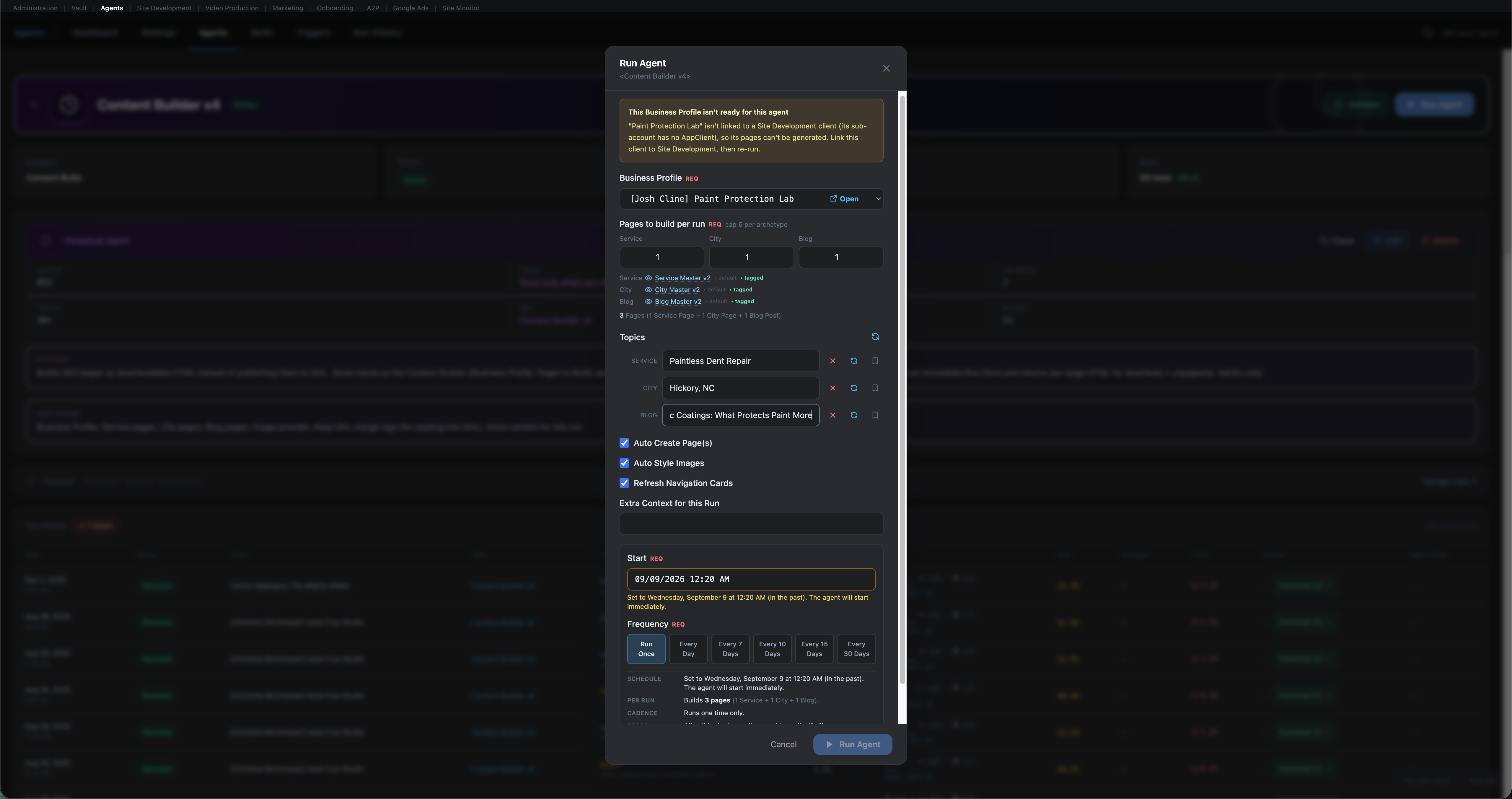
The run shown here has a separate topic for the Service page, City page, and Blog post.
The current panel exposes these choices directly rather than treating every scheduled run as identical.
The interface also warns when a selected start time has already passed and states that the run will start immediately.
Build the Run Around the Site, Not the Other Way Around
One Scheduled Run Can Mix Service Pages, City Pages, and Blog Posts
The screenshot example builds three pages in one run: one Service page, one City page, and one Blog post. I like that model because it makes the scheduler think in terms of the site's actual content mix rather than treating every run as a pile of identical URLs.
That does not mean every batch should be one of each. A new site may need its core service pages before it needs several articles. A mature local site may already have its main service pages and need more city coverage or supporting articles. A seasonal campaign may call for a one-time group tied to a specific service or market change.
The page mix should follow the content backlog. The scheduler is there to execute the plan you already decided, not to decide which part of the site deserves attention.
Choosing a Frequency
How Often Should You Schedule New SEO Pages in HighLevel?
There is no universal publishing interval I would recommend for every site. The current panel offers Run Once, Every Day, Every 7 Days, Every 10 Days, Every 15 Days, and Every 30 Days. The useful choice depends on how much real work is ready behind the next run.
A one-time run makes sense when you already know the exact pages you want, such as a new service launch, a small group of missing city pages, or a set of articles prepared from a completed topic list.
Daily or short recurring runs can create a lot of pages quickly. I would reserve that pace for cases where topics, source material, media, site structure, and review capacity are already in place.
Seven, ten, fifteen, or thirty-day spacing can fit teams that want a steadier production rhythm with more time between batches for review, new source material, and site cleanup.
Frequency is an operating choice, not a ranking promise.
Publishing more often does not mean a site will rank faster or better. The broader question of how AI-assisted content fits into search and SEO deserves its own discussion. For scheduling, I care first about whether each run has a valid page purpose and whether somebody will review the result.
Use the Run Itself to Add Current Context
The "Extra Context for This Run" Field Gives Scheduled Batches Room for Current Business Details
A recurring schedule does not mean every future run has to use an identical brief. The current panel includes an Extra Context field that can carry details that matter to this particular batch.
A seasonal service, new offer, revised service area, new photo group, new FAQ, new priority, or client note can belong here when it affects the pages in this run.
If a fact should remain true across future pages, it belongs in the durable business source material rather than being repeatedly pasted into one-off run notes.
This is one reason I separate the production question from the
scheduling question. A good recurring run still depends on the human
side keeping business information, page topics, and run-specific
direction current.
Run History Matters After the Schedule Is Saved
The Content Builder Run History Gives You a Place to Check What Actually Happened
A schedule is only the instruction. The run history is where the team can see whether the instruction produced a successful run, which page types were created, how long the run took, and where the output is available.
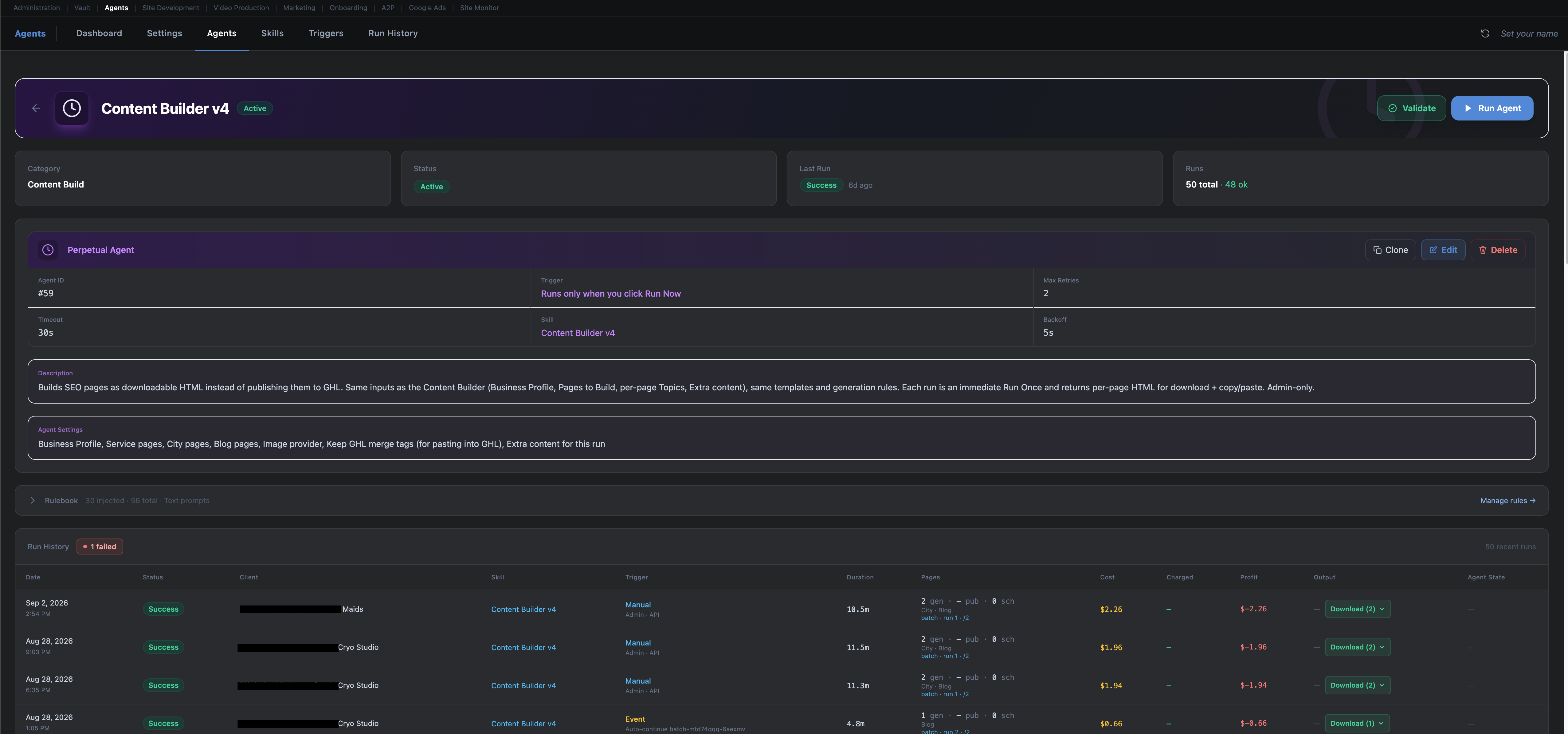
A recurring plan needs a visible success or failure state so the next batch does not hide a problem from the previous one.
The history can distinguish manual and event-driven runs, which helps explain why a batch exists.
Generated page counts make it easier to compare the planned batch with the actual output.
The current view exposes downloadable output for completed runs, giving the team a concrete item to review.
A Recurring Schedule Still Needs a Human Checkpoint
Review Each Batch Before the Schedule Becomes a Page Factory
The useful feedback loop is simple: run, review, fix the source if needed, connect the new pages to the site, then let the next run happen. If a recurring issue is visible in one batch, fix the input before producing more pages with the same issue.
Confirm the batch finished and the page mix matches what you expected.
Check facts, headings, claims, locations, calls to action, and anything that sounds too generic.
Make sure each image fits the subject and no fallback image is being mistaken for real business proof.
Review site links, useful internal links, page hierarchy, and any supporting cards that should point to the new URLs.
If the same problem can repeat, correct the business data, page brief, topic list, or run instructions first.
"Refresh Site Cards" is a small setting with a useful reminder behind it.
New pages should not be treated as isolated files. If a URL is worth publishing, think about where a visitor should find it and which related pages should point to it. The scheduler can help with the production step, but site structure still needs editorial judgment.
Example Scheduling Models
Three Practical Ways an Agency Could Use Content Agent Scheduling
These are examples, not ranking formulas. The useful cadence depends on the client's real page backlog, source material, review capacity, and site needs.
Model 01
One-Time Build
Best for a defined batch
Prepare a small list of missing service, city, or supporting article pages and run them once.
Review the full group before deciding whether another batch is needed.
Model 02
Steady Recurring Production
Best for an active topic queue
Use a wider recurring interval, then review each batch while the next group of topics and source material is prepared.
This gives the site a steady publishing rhythm without forcing the team into daily review.
Model 03
Short Project Burst
Best when more material is already ready
Use a shorter interval for a limited period when the business has a larger prepared page list and the team has time to review the output.
Return to a slower pace after the project queue is cleared.
Slow the Schedule Before Quality Slips
Six Signs Your SEO Page Schedule Is Moving Faster Than the Site Is Ready For
The best reason to slow down is not fear of publishing. It is seeing that the human side of the process is no longer keeping up with the production side.
01
The Topic Queue Is Getting Thin
New titles start sounding like slightly different versions of
pages that already exist.
02
Source Material Is Repeating
Every new page is built from the same few business facts with
no page-specific information added.
03
Nobody Is Reading the Last Batch
Review falls behind and the next run starts before the last
pages have been checked.
04
New Pages Are Not Connected to the Site
URLs are being created faster than site links, related content,
and useful internal links are being updated.
05
The Same Error Appears More Than Once
A business fact, city, image, or wording problem repeats because
the source data was never corrected.
06
The Page Count Is Driving the Strategy
The team starts asking what else it can publish instead of what
the business and visitor actually need next.
A scheduled run should remove repetitive production work, not remove editorial responsibility.
Our AI Content Disclosure explains the same human-led principle for this site's own content. The writing tool can help. The person publishing the page still owns the source facts, final claims, and final review.
A Practical Scheduling Checklist
Set the Next Content Agent Run Only After These Eight Questions Have Answers
This is the simple check I would use before turning a one-time page build into a recurring schedule.
Service, City, Blog, or a mixed run.
Each page needs a clear subject before the run.
Business facts, service areas, offers, and media should be ready.
Add current notes that apply only to this batch.
Page creation, image styling, and site-card choices should match the job.
Pick the actual start time instead of leaving timing ambiguous.
Choose the recurring pace based on the human review queue.
A scheduled run still needs a named person or team responsible for review.
Related Content
Continue From Page Production Into Quality, Search, and Distribution
These resources continue the subject without repeating the scheduling process above.
Let the Schedule Follow the Editorial Queue
The Best Content Agent Schedule Is the One Your Team Can Keep Feeding and Reviewing Well
The scheduler gives you useful control over page counts, topics, run options, extra context, start time, and recurring frequency. That does not mean the shortest interval is the best one. I would rather publish a smaller batch that was sourced, reviewed, and connected to the site properly than create a larger queue that nobody has time to read.
Start with the content plan. Use the schedule to carry out that plan. Check the run history. Review the pages. Fix recurring issues at the source. Then let the next batch run when the human side of the process is ready for it.